Tool Review · Updated March 2026
Freepik Spaces review: a creative pro's honest take.
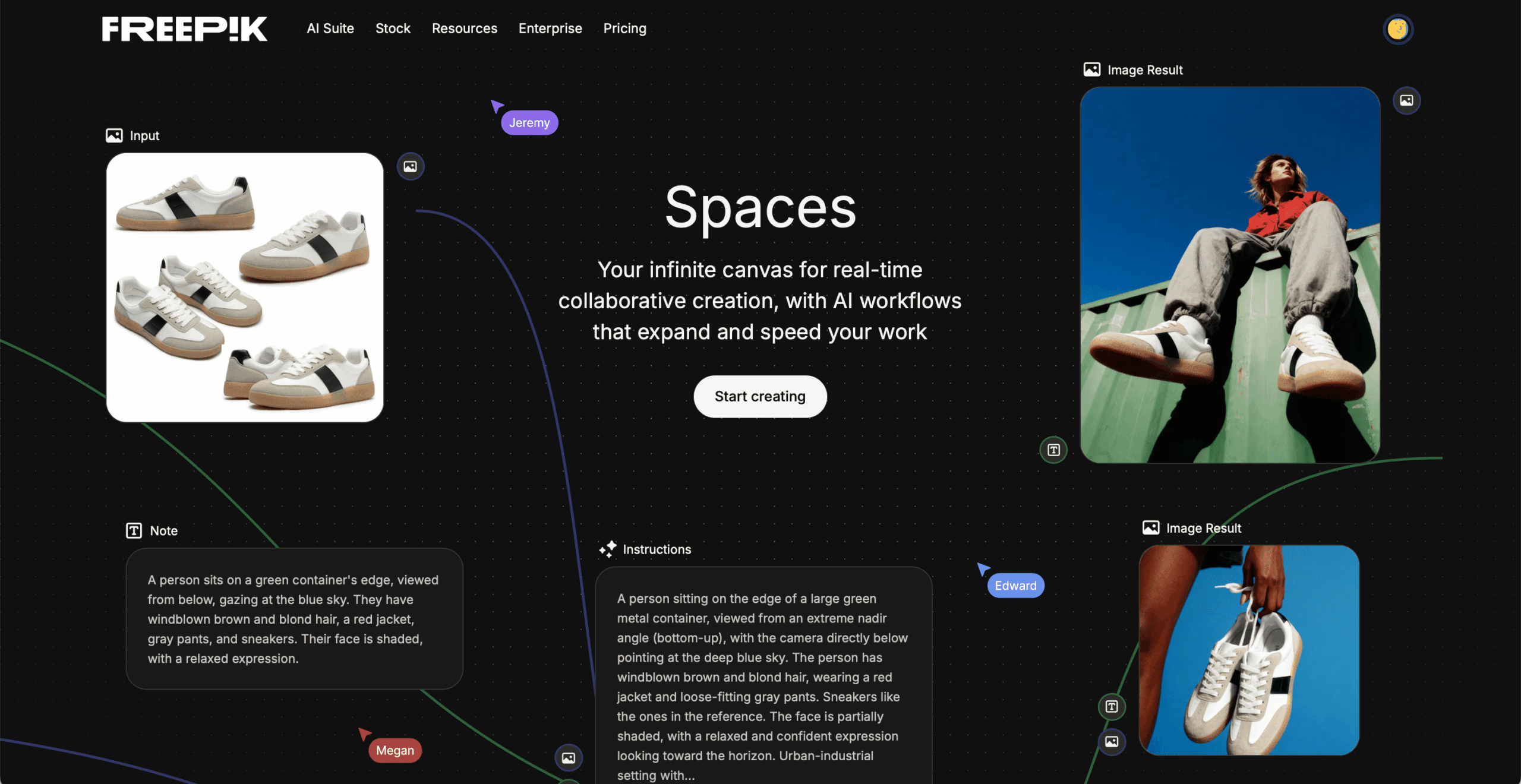
If you're a working creative in 2026, you know the chaos. Midjourney in one tab, Magnific in another, Photoshop open for compositing, Runway for video, files scattered across three drives. Freepik Spaces is an attempt to end that fragmentation. It's a node-based infinite canvas that brings AI image generation, video, audio, upscaling, and editing into a single collaborative workspace.
We've been using Freepik Spaces for real client projects at Memorable Studio — specifically for brand visual campaigns where we need to produce 30–80 coherent assets across multiple formats. This review is based on that production experience, not a weekend of casual testing.
Disclosure: We have no affiliation with Freepik. We pay for our own subscription. This review reflects our genuine experience using Spaces for professional brand visual production.
What Freepik Spaces actually is
Freepik Spaces is a cloud-based, infinite canvas where you build visual workflows by connecting nodes. Think of it as a hybrid between Figma (the canvas), Miro (the collaboration), and ComfyUI (the node logic) — but without the technical complexity of ComfyUI.
Each node performs a specific task: text input, AI image generation, video generation, upscaling, or editing. You connect them with wires to build a visual pipeline. Once you've built a workflow that produces the look you want, you can reuse it across an entire campaign. That's the key differentiator: you're building a recipe, not pulling a slot machine.
The platform integrates 30+ AI models including Nano Banana 2, Nano Banana Pro, Flux 2 Pro, Flux Kontext, Seedream 4.5, GPT Image 1.5, and many others. Video models include Kling, Wan, and MiniMax Hailuo. You select the right model for the right task within the same canvas — no tab-switching, no downloading and re-uploading.
What we tested: real brand production
We used Spaces for a hospitality client campaign requiring consistent visual environments across multiple scenes. The workflow involved generating base compositions with Nano Banana 2, maintaining a desaturated warm palette (our validated art direction), and producing 40+ final assets across social, editorial, and print formats.
The node-based workflow: genuinely useful
The ability to chain operations is where Spaces earns its value. We built a pipeline that started with a text prompt node, fed into Nano Banana 2 for generation, then connected to the Magnific upscaler for print-ready output. When we needed to adjust the art direction midway through — shifting the colour temperature warmer — we changed one parameter in the prompt node and regenerated the entire downstream chain. In a traditional workflow, that would have meant re-prompting dozens of individual images.
The collaboration layer is the real differentiator. Multiple team members can work on the same canvas simultaneously, leave comments on specific nodes, and see each other's iterations in real time. For brand work where art direction approvals matter, this is significant. Our creative director could validate outputs directly in the canvas instead of reviewing exported files in a separate review tool.
Nano Banana 2: the standout model
Nano Banana 2 (Google's Gemini 3.1 Flash Image) is the model we used most. Its strength for brand work is consistency: it maintains character identity, lighting logic, and colour grading across multiple generations better than most competitors. The multi-image editing capability — modifying one element without disturbing the rest of the composition — is particularly valuable for campaign production where you need scene variations that still feel cohesive.
For photorealistic brand photography, Nano Banana 2 produces results that require less post-production than Midjourney V6. The textures are more natural, the lighting more physically accurate. Where it falls short is in the artistic, almost painterly quality that Midjourney does best. For editorial hero images, we still reach for Midjourney. For volume production with brand consistency, Nano Banana 2 wins.
Where Spaces falls short
Credit consumption is aggressive. High-resolution generations with premium models drain credits fast. On the Premium+ plan (45,000 credits/month), a full campaign of 40+ images with upscaling consumed roughly 60% of our monthly allocation in one project. Studios running multiple concurrent campaigns will need the Pro plan and its 300,000 credits/month.
The free tier is essentially unusable. You can create 3 Spaces, but without AI credits, you're just looking at an empty canvas. Even the Essential plan runs out quickly during serious production.
Learning curve exists. The node system is intuitive for anyone who's used Figma or Miro, but understanding how to build efficient multi-step pipelines takes experimentation. Expect to spend a full day getting comfortable before you're productive.
No offline mode. Everything runs in the browser. If your connection drops mid-generation, you lose that iteration. For studios in areas with unreliable internet, this is a real constraint.
Freepik Spaces vs the alternatives
vs Midjourney: Midjourney still produces superior artistic output, especially for hero images and concept art. But it offers zero collaboration, zero workflow automation, and requires Discord or its web app for a one-prompt-at-a-time experience. Use Midjourney for premium single images, Spaces for collaborative volume production.
vs Flora AI: Flora offers a similar node-based canvas with strong model integration. Flora's Style DNA system for maintaining brand aesthetics is arguably more sophisticated. But Freepik's model library is broader, and the Spaces collaboration tools (real-time co-editing, commenting) are more mature. For solo creators, Flora might edge ahead. For teams, Spaces wins.
vs ComfyUI: ComfyUI offers vastly more technical control and runs locally, which matters for privacy-sensitive projects. But the learning curve is brutal, there's no built-in collaboration, and managing models locally requires significant hardware. Spaces trades maximum control for accessibility and teamwork.
Pros and cons
- Node-based workflows create repeatable, consistent results
- Real-time collaboration is genuinely useful for team projects
- Broadest model selection on any single platform (30+ models)
- Nano Banana 2 excels at brand-consistent photorealistic output
- Magnific upscaler built-in saves a separate subscription
- Templates lower the barrier for non-technical team members
- Auto-mode intelligently selects the best model for your prompt
- All generations saved to Creations automatically
- Credit consumption is aggressive on premium models
- Free tier is essentially non-functional for real work
- Pro plan jump from €27 to €172.50/month (annual) feels steep
- No offline mode or local processing option
- Video generation quality varies significantly by model
- Complex pipelines can feel sluggish with many nodes
- Limited community resources and no active user forum
- Email-only support can be slow during deadline pressure
Who should use Freepik Spaces
It's ideal for: Creative agencies and marketing teams producing volume brand content who need collaboration, workflow consistency, and multi-model access under one subscription. If your workflow currently involves bouncing between 4+ AI tools and sharing files via Slack, Spaces will immediately improve your efficiency.
It's not ideal for: Solo artists who prioritise maximum artistic quality over workflow (stick with Midjourney). Power users who want full pipeline control (use ComfyUI). Casual users or hobbyists (the cost doesn't justify occasional use).
Memorable Studio verdict
Pricing overview (March 2026)
Freepik offers four individual plans, with a 25% discount on annual billing. Here's the breakdown:
Essential: €8/month (monthly) or €6/month (annual) — 8,000 credits/month or 96,000/year. Includes Magnific upscalers and access to all models, but no unlimited generations and no LoRA training. Enough for testing, not for production.
Premium: €16/month (monthly) or €12/month (annual) — 20,000 credits/month or 240,000/year. Adds 200M+ premium stock assets. Still no unlimited generations or LoRA training.
Premium+: €36/month (monthly) or €27/month (annual) — 45,000 credits/month or 600,000/year + unlimited generations on selected models with fast gens (Nano Banana 2, Nano Banana Pro, Seedream 4.5, GPT Image 1.5, Flux.2 Max, Kling 2.5, Kling 3.0). Also unlocks Magnific & Topaz upscalers, LoRA training (styles, characters, products), commercial AI + music rights, and top-up credits. The sweet spot for most professional users.
Pro: €230/month (monthly) or €172.50/month (annual) — 300,000 credits/month or 4,000,000/year + unlimited with fast gens on all the same models. Adds early access to AI features and the lowest cost per credit (marked 20% cheaper). For high-volume studios running multiple campaigns concurrently.
Prices exclude VAT. Annual plans give all credits upfront with no monthly resets. Teams and Enterprise plans also available.
Our recommendation: Premium+ at €27/month (annual) is the clear winner for professional creative work. The unlimited fast generations on Nano Banana 2, Seedream 4.5, and Kling 2.5 alone justify the price — you'd pay more for separate subscriptions to access those models individually. The jump to Pro only makes sense if you're burning through 45,000 credits/month consistently, which typically means 3+ concurrent campaign projects.
FAQ
You can create up to 3 Spaces on the free plan, but AI generators require credits. Meaningful use requires at least the Essential plan at €8/month. For brand production, Premium+ (€27/month annual, with unlimited fast gens on Nano Banana 2, Seedream 4.5, and more) is the realistic starting point.
Different tools for different needs. ComfyUI offers deeper control and runs locally, but has a steep learning curve. Freepik Spaces is browser-based, collaborative, and more accessible. For team-based brand work, Spaces wins. For maximum technical control, ComfyUI remains superior. Read our full comparison.
Not entirely. Midjourney still produces arguably more artistic results for hero images. But Spaces offers collaboration, workflow automation, and multi-model access that Midjourney cannot. Many studios use both. Read our Midjourney review.
Over 30 image models including Nano Banana 2, Nano Banana Pro, Flux 2 Pro, Flux Kontext, Seedream 4.5, GPT Image 1.5, Recraft V4, and many others. Video models include Kling, Wan, MiniMax Hailuo, and Runway. The selection is updated frequently.
For professional brand production, we recommend Premium+ at €27/month (annual billing), which includes 600,000 credits/year and unlimited fast generations on key models like Nano Banana 2, Seedream 4.5, and Kling 2.5. High-volume studios should consider Pro at €172.50/month (annual) for 4M credits and early access to new AI features.
for your brand?
Related reviews: Flora AI Review · Higgsfield AI Review · Midjourney for Brands · Best AI Image Generators 2026